
| February, 2002 |
|


Barrier-Free Web
Barrier-Free Web
How do you read a web page when you can't see? How do you surf the web if you can't use your hands to navigate a mouse or keys? If you have a cognitive or neurological disability, how do you begin to find your way through a website if the site your viewing has a lack of consistent navigational structure or a significant amount of non-text material? It's easy to take for granted the ease of access most of us have. However, for those with certain disabilities, something as ordinary as searching the web for a new book can prove almost impossible. But with the implementation of Section 508, barriers are being eliminated as e-access becomes the primary goal of companies, government, and everyday people.
Section 508, an amendment to the Workforce Rehabilitation Act of 1973, requires that all electronic information developed or purchased by the federal government be made accessible to people with disabilities. Initially established in 1986, Section 508 had no binding guidelines for technology accessibility. In 1998, however, President Clinton signed into law the revised version, therefore creating enforceable standards to be used by the Federal Government.
In order to establish web accessibility standards for web and hardware designers to use, the Electronic and Information Technology Access Advisory Committee (EITAAC) was created in October of 1998. Its final accessibility standards were issued December 1, 2000. With the implementation of these standards, all federal government websites are in the process of being made accessible while many web designers are creating accessibility tests to be run on web pages.
However, for some, that doesn't necessarily solve the current obstacle of using the web. Section 508's rules and regulations, in its attempt to make information technology as accessible as possible, is geared most directly at non-visual users. Though there is a clear and definite need for non-visual user access, 508 inadvertently lapses when addressing other disabled user needs. Through the W3C World Wide Web Consortium's Web Accessibility Initiative (WAI), access for other users with disabilities, such as the needs of those with hearing, physical, cognitive and neurological disabilities are being addressed.
WAI is working to develop and implement software and hardware in all computers (not just through the Federal government) that would allow all people, regardless of disability, to effectively navigate the web. But until the issue of universal information technology access is resolved, the question remains as to how one navigates the web when there is a specific disability barrier.
For individuals who are blind or visually impaired, screen readers (an assistive technology devise that, on average, costs about $800) allow the user to navigate the web, free of a mouse. The reader itself looks for ASCII text and speaks it out loud while the individual utilizes keystrokes to navigate the web. Though a wide array of screen readers are available, the websites themselves must provide text equivalents for graphics, equivalent alternatives to multimedia, and equivalent access to tables, frames, and scripting in order for the screen reader to effectively work. However, how does one navigate the web if the problem is not visual access but rather physical access?
In a recent online conversation with Susan Yim, a Research Molecular biologist who is also a quadriplegic with limited use of her hands, computer and web accessibility is of utmost importance.
 D.
D.
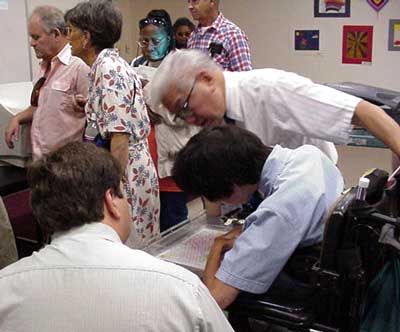
Susan Yim, in center, at the Library for the Blind and Physically Handicapped during its "Technology Day."
Susan Yim doesn't access the Internet or navigate the computer in the traditional sense. Rather, she uses "mini Morse," a system that utilizes morse code and consists of an IBM computer, 2 thumb-operated switches, and a "mini morse" keyboard emulator. Yim uses the switches to input Morse code signals into the computer. The keyboard emulator then translates these signals into letters. For each letter and command key on a traditional keyboard, there is a corresponding Morse code signal. "There really aren't commands a non-handicapped keyboarder can do that I cannot do with my switches," declares Yim.
When she is not able to navigate a website without a mouse, Yim uses a "cirque," a 3x5 plate with a screen which is manipulated by touch to move the mouse cursor.
 D.
D.
A variety of devices Susan Yim uses to communicate.
In her own words, she states, "I find my computer system invaluable to performing many tasks: e-mailing, word processing, and Internet researching-all of which I've used in the last 10 years in my job as a Research Molecular Biologist with Aberdeen Proving Ground. I am able to work out of my home, calling the base via modem. I read, review, and summarize scientific articles on a variety of topics, providing background information to researchers at APG with my Mini Morse."
Though Section 508 may not specifically address all of the accessibility issues for all users, it does open the door to new ideas and applications for the integration of technology and web, hardware, and software design. Ultimately, Section 508 has made it necessary to fuse accessibility concepts, creative engineering, and assistive technologies in order to fully utilize the abilities of the Internet, and to fully integrate a field of ideas.
