 |
September 1997 |
 |
|
 |
|
|
|
September 1997 |
| |
|
|
|
|
A First Person Report
by Donald M. Spaeth, Ph.D. Candidate, University of Pittsburgh
I am a computer access specialist who has a penchant for taking on challenges. I have worked with a lot of people with paraplegia who use computers and a number of people with quadriplegia who use computers by means of a headwand or a head mounted mousing device. When someone is restricted to single switch access, however, the game gets a lot rougher. It takes an exemplary person to undertake the often grueling, tedious effort required to operate a scanning interface.
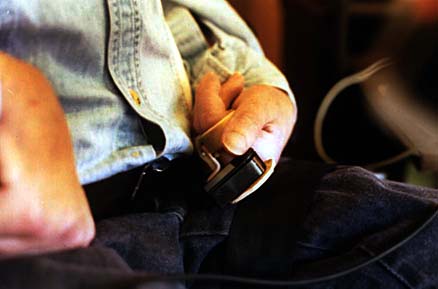
D. Greg Smith is one of these individuals. I first met Greg in September 1996; a friend of mine, Ken, a Speech Pathologist, asked me to consult. Ken wanted to help Greg use a computer to write his school assignments. Greg showed such unusual aptitude that I set about investigating how he might utilize his writing skills to generate email. Shortly, I'll discuss some of the software barriers we had to overcome. But first, a little more about Greg. Greg is a 37 year old man with cerebral palsy who lives in a neighborhood group home on the north side of Pittsburgh. Greg is unable to speak and uses a voice output communication aid. He has severe motoric disabilities; he has only two sites of volitional movement, sideways motion of his head and microswitch activation with his left thumb. Greg uses his left thumb to operate his communication aid and his headswitch to drive his power wheelchair.
Greg operates his electric wheelchair with a scanning interface. The four joystick directions are flashed sequentially on a module mounted on his right armrest. When the desired direction is highlighted, Greg would activate his head switch and his wheelchair would slowly ooze forward, backwards right or left at a turtle pace. On many of my visits I would arrive at the group home before Greg returned from school. I'd be working earnestly away on Greg's computer and hear the soft whine of his wheelchair motors in the distance; several minutes would pass while Greg navigated the last ten feet into his room, including a delicate figure 'Y' turn to clear the doorway.
He always greeted me with a bright smile that said "what have you cooked up for me today?"
D. Greg has a communication aid equipped with a serial port. Using a special cable and software, the characters and words Greg generates on the aid flow through to the computer and appear on the monitor screen just as if typed on the keyboard. Each day we would add some new commands to Greg's communication aid to enhance his control of the computer.
The biggest barrier blocking individuals with disabilities from operating today's computer systems is the Graphical User Interface (GUI). Pioneered by Macintosh in the mid 1980's and imitated by Microsoft in the 90's, GUI's have revolutionized computer operations for the average citizen. By pointing and clicking with a mouse, even persons with little formal training can run current software. A mouse unfortunately requires fine motor skills to operate and that was exactly what Greg didn't have. Fortunately the thoughtful system designers at Microsoft provided keystroke alternatives for just about every mouse action normally used on the Windows 95 operating system. For example, to obtain a command from the menubar you can press the Alt key once to highlight the menubar and then use the horizontal arrow keys to step across the menu titles.. You can then use the vertical arrow keys to select specific commands within an individual menu. If you fall off the bottom of a menu, the highlight will "wrap around" to the top of the same menu; it's pretty slick!
I must really give Greg credit for making a crucial discovery that made his communication aid a practical method for accessing Windows 95. He was trying to select the print command from his computer's "File" menu. I noticed that he was holding down his thumb switch and not doing anything; meanwhile, his computer menu was scanning automatically. This was very strange because I had not installed any special software on the computer itself; so how was it scanning? The answer was that when Greg chose the down arrow key on his communication aid and held his switch down, an auto repeat feature kicked in. A stream of down arrows flowed to the computer and the menu scanned. Thus Greg could either scan on the communication aid to generate text and words; or, by holding down his access switch, scan all the commands in the computer program. Arrow keys allow scanning through menus; tabs allow scanning through on-screen buttons.
We were off and running. We obtained a subscription to America on Line, set up a modem, and Greg was soon able to access, write and send email. Future goals include using chat rooms and Web browsing. Email is especially emancipating for individuals who communicate by scanning. In real time settings, communication partners, even compassionate ones, get bored and frustrated waiting for a message to be constructed. In an email environment, only finished messages are received; no one has to know how long it took to create it. Next month I am going to get Greg to write down some his own thoughts about this process; how it feels to send whole messages to his family members and friends.
Have any questions or ideas for Don Spaeth or Greg Smith? You can email the dynamic duo at:
greg1smith@aol.com
 Home |
 Newsletter |
 Calendar |
 Previous |
 Index |
 Next |
 Contact |
 D.
D.